Self-Hosting Security: Traefik, Cloudflare, Authelia, CrowdSec Setup Guide
Learn how to protect your self-hosted services with Traefik, Authelia, CrowdSec, and Cloudflare — complete setup guide with real-world tips

When i first started looking at reverse proxies i came across traefik and have never looked back since.
This article will show you how i setup the following:
- traefik with a socket proxy, automatic Lets Encrypt wildcard certificate renewals via DNS Challenge and the necessary settings to achieve A+ rating on ssllabs.com for a directly exposed service
- Cloudflare setup with the necessary security settings to achieve A+ on ssllabs.com
- Cloudflared tunnels with traefik
- Integrate CrowdSec Web Application Firewall with traefik
- Integrate Authelia with traefik
- Country blocking for directly exposed services in pfSense
Since i initially set all of this up in Docker Compose and have since migrated to Docker Swarm i have included configurations for both.
Cloudflare & Cloudflared tunnel
Dashboard Configuration
User API Token
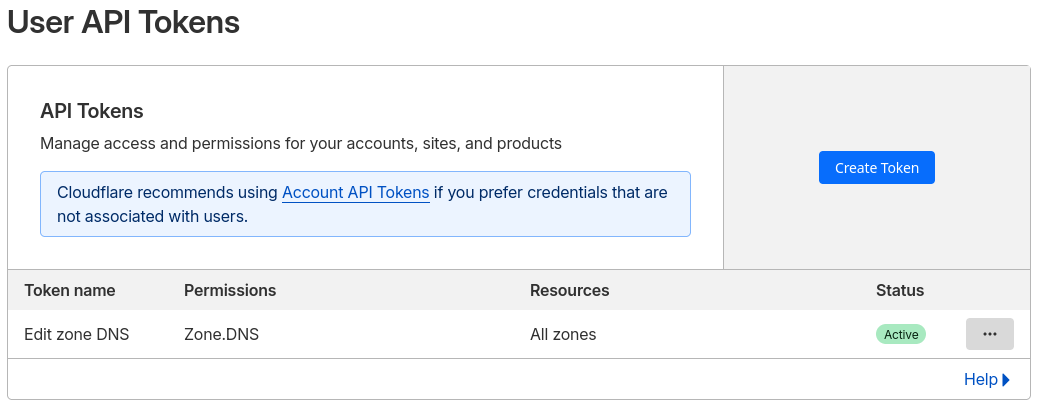
For traefik to have permission to handle the certificates we need an API key with the relevant permissions.
In your Cloudflare dashboard go to your Profile settings > API Tokens and create using the Edit Zone DNS template, specify which Zones to include or use All Zones
Make a note of this for later when setting up traefik. This will be required later for the traefik_cf_dns_api_token docker secret.
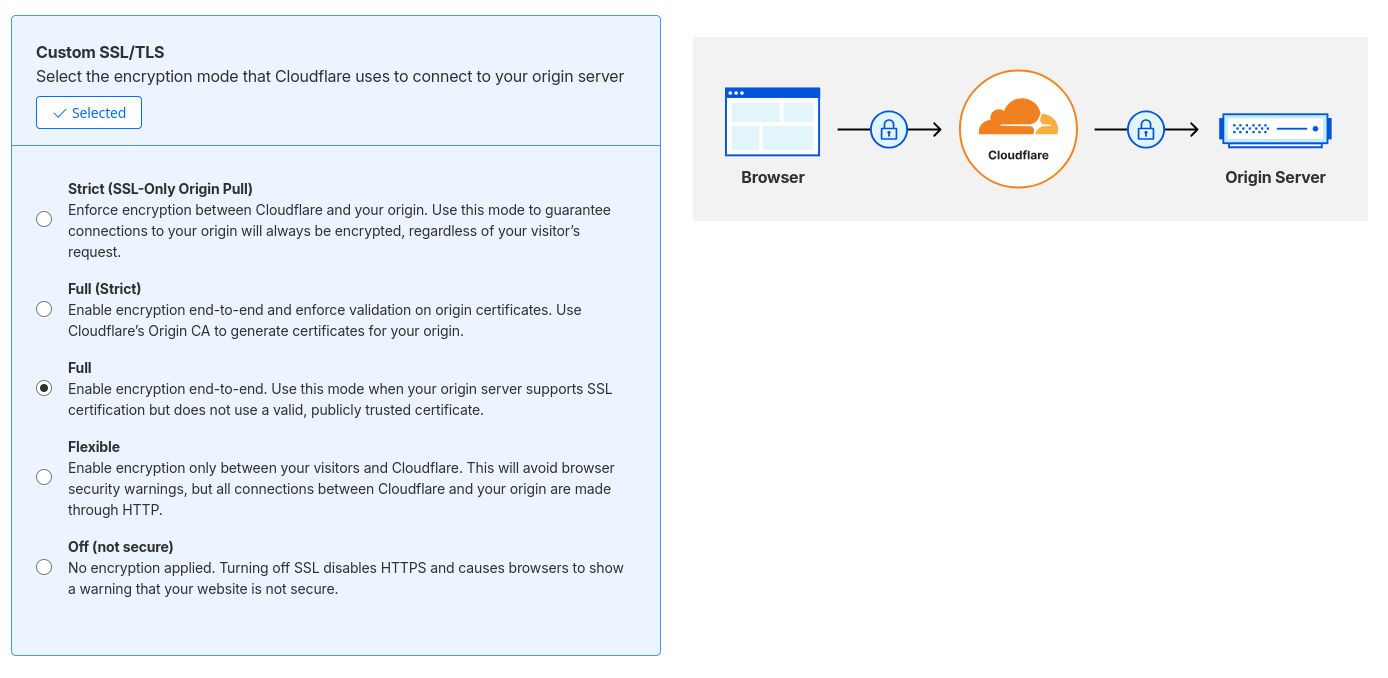
SSL/TLS > Overview / Encryption Mode
By default this is set to Automatic, i changed mine to Custom - Full
SSL/TLS > Edge Certificates
Enable the following settings
- Always use HTTPS
- HTTP Strict Transport Security (HSTS)
- Max Age: 12 Months
- Include Subdomains
- Preload
- No Sniff
- Minimum TLS Version to TLS 1.2
- Enable TLS 1.3
- Automatic HTTPS Rewrites
Security > Security Rules
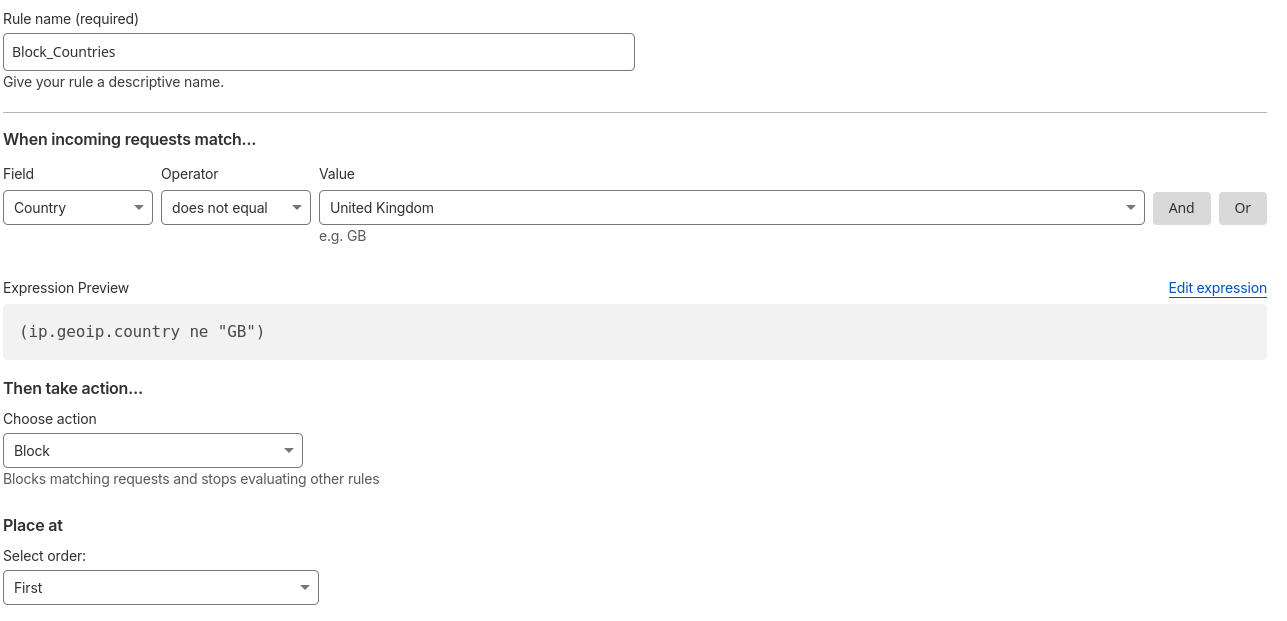
Country Blocking
For my personal self hosted services i don't need the whole world being allowed to get past Cloudflare so i have a rule to prevent that
Bot Fight Mode
Enable this to prevent some of the bot traffic needing to be filtered out by crowdsec
Rules > Page rules
When i first started using bookstack i noticed email addresses were being redacted.
Create a Page Rule with the Email Obfuscation setting turned off to prevent this
Docker Configurations
Now that Cloudflare is configured we need a tunnel creating before we can publish an application.
Open the Zero Trust Dashboard and head to Networks > Connectors > Create Tunnel
Select Cloudflared and copy the token it provides for the tunnel to use in the compose configuration.
When i initially set this up the token wouldn't work in a docker secret, an update has added the TUNNEL_TOKEN_FILE environment variable to do this now.
If you don't already have a proxy network defined to spin this up then see the traefik section or spin this up after.
Swarm Configuration
Create secret with echo -n 'yourapikey' | docker secret create cloudflared_token -
services:
  cloudflared:
    image: cloudflare/cloudflared
    command: tunnel --no-autoupdate --metrics 0.0.0.0:60123 run
    environment:
      TUNNEL_TOKEN_FILE: /run/secrets/cloudflared_token
    networks:
      - proxy
    ports:
      - 60123:60123
    secrets:
     - cloudflared_token
    deploy:
      mode: global
      restart_policy:
        condition: on-failure
        delay: 5s
        max_attempts: 3
        window: 60s

secrets:
  cloudflared_token:
    external: true
networks:
  proxy:
    external: true
cloudflared/docker-compose.yml
Docker Compose Configuration
My previous compose file using a .env file with the TUNNEL_TOKEN=apikey variable
services:
  cloudflared:
    container_name: cloudflared
    image: cloudflare/cloudflared
    restart: always
    command: tunnel run
    environment:
      - TUNNEL_TOKEN=${TUNNEL_TOKEN}
    networks:
      - proxy
    security_opt:
      - no-new-privileges:true
    labels:
      - com.centurylinklabs.watchtower.enable=true
networks:
  proxy:
    external: true
cloudflared/docker-compose.yml
Zero Trust Dashboard - Published Application
To publish an application head to the Zero Trust Dashboard > Networks > Connectors > and configure the tunnel previously created. Under here go to Published Application Routes
Ensure any containers being published are in the same proxy network as traefik that will be created in the next section.
When creating a new published application i have used the following settings:
- Service: HTTPS://traefik
- Additional Application Settings > TLS options
- Origin Server Name - *.selfhostnotes.dev
- Enable HTTP2 Connections
Monitoring
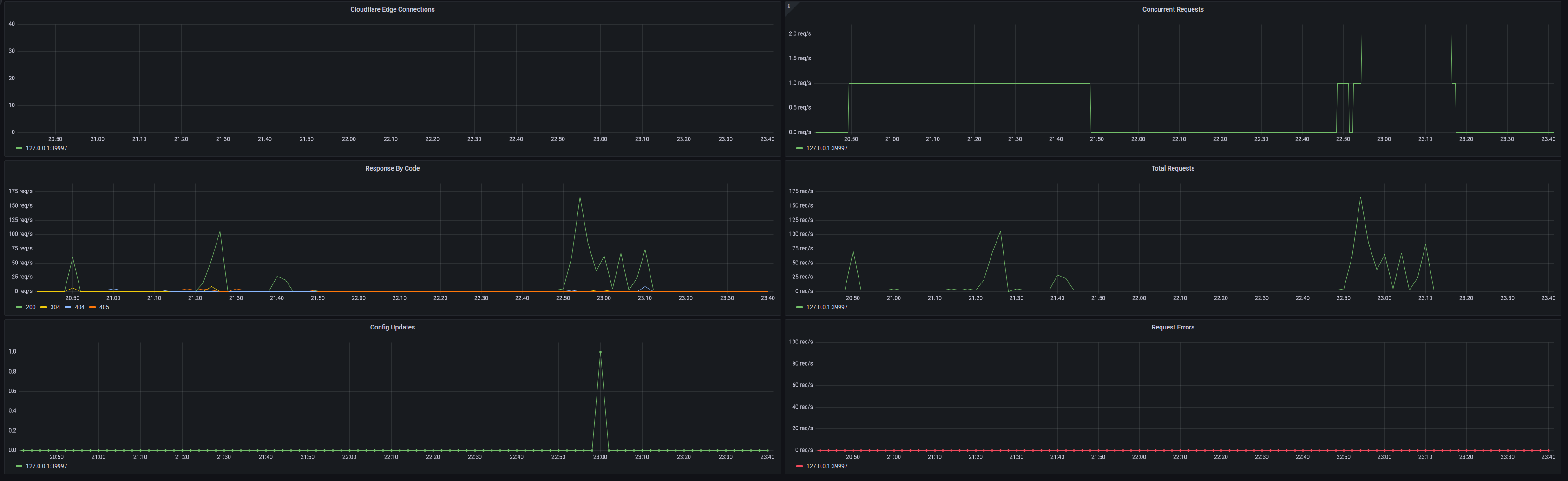
This cloudflared config also has prometheus metrics enabled so we can import a Cloudflared Grafana dashboard... of which there only appears to be one - ID 17457
Cloudflared Container Issues
Increase UDP Buffer Size
docker logs cloudflared shows this error:
failed to sufficiently increase receive buffer size (was: 208 kiB, wanted: 7168 kiB, got: 416 kiB). See https://github.com/quic-go/quic-go/wiki/UDP-Buffer-Sizes for det
ails.
Check existing valuessudo sysctl net.core.rmem_max
sudo sysctl net.core.wmem_max
net.core.rmem_max = 212992
net.core.wmem_max = 212992
Update temporarilysudo sysctl -w net.core.rmem_max=7500000
sudo sysctl -w net.core.wmem_max=7500000
Update Permanentlyecho "net.core.rmem_max=7500000" | sudo tee -a /etc/sysctl.conf
echo "net.core.wmem_max=7500000" | sudo tee -a /etc/sysctl.conf
sudo sysctl -p
Client IP of 172.18.0.1 in traefik access.log
Since crowdsec uses this log to make decisions it's important the client IP is correctly identified.
This one took a while to narrow down but i eventually noticed that these external requests that would intermittently show up in the access log and crowdsec alerts console would only occur when the cloudflared container was running on the same node as traefik. Since i have cloudflared set to global, the request could come from 1 of 3 nodes.
Ultimately the fix for this was to do the following:
- In the Cloudflare console, change my published application route from using the keepalived VIP and just use the container name traefik instead
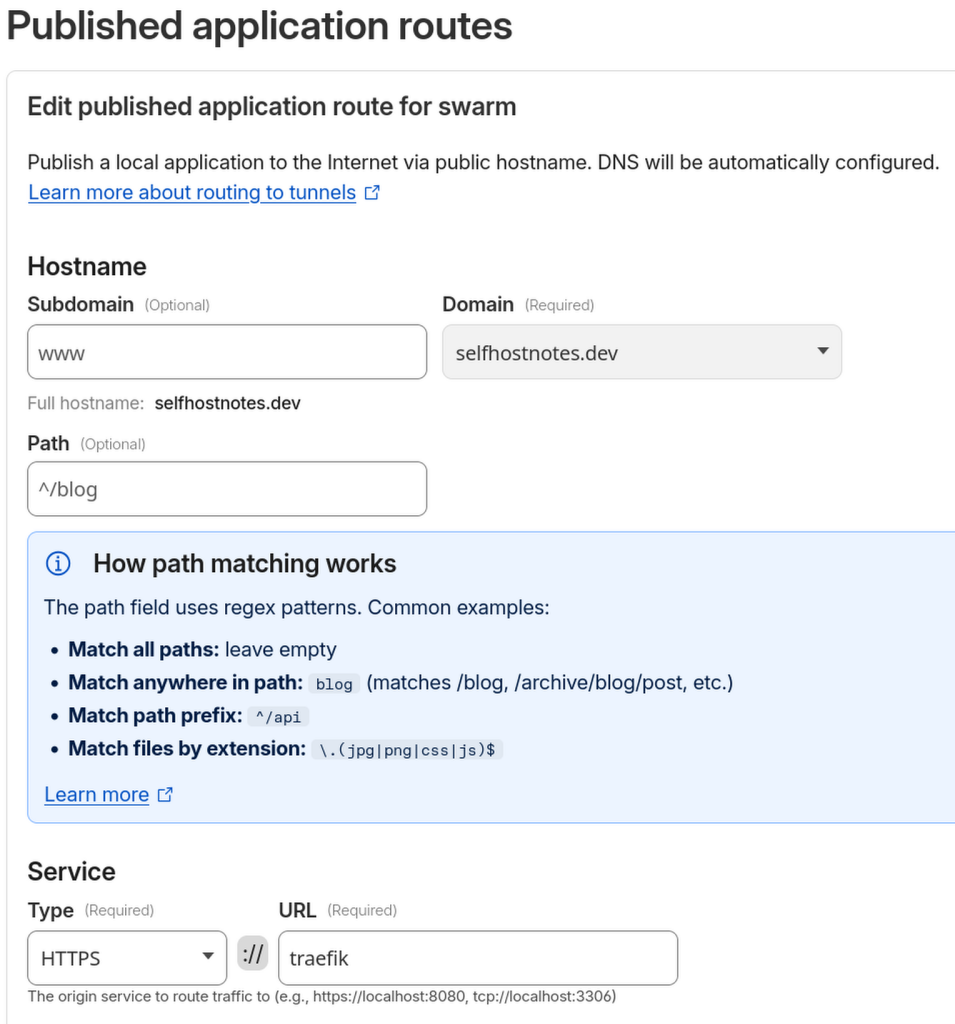
- Once this was changed the requests would now appear to come from the proxy network IP range. Add this range to the trustedIPs traefik static config to then have the true client IP in the log every time.
socket proxy
This is optional but i have been using a socket proxy for my containers for a while, i've included the required APIs for traefik weather it's run in normal docker or swarm.
Create the required network for socket-proxy
#Swarm
docker network create --driver overlay --internal --subnet x.x.x.x/24 socket-proxy-traefik

#Docker Compose
docker network create --driver bridge --internal --subnet x.x.x.x/24 socket-proxy-traefik
Docker Swarm
services:
  socket-proxy-traefik:
    image: lscr.io/linuxserver/socket-proxy:latest
    environment:
      - LOG_LEVEL=info # debug,info,notice,warning,err,crit,alert,emerg
      ## Variables match the URL prefix (i.e. AUTH blocks access to /auth/* parts of the API, etc.).
      # 0 to revoke access.
      # 1 to grant access.
      ## Granted by Default
      - EVENTS=1
      - PING=1
      ## Revoked by Default
      # Security critical
      - AUTH=0
      - SECRETS=0
      - POST=0
     # Other
      - NETWORKS=1
      - SERVICES=1
      - TASKS=1
      - VERSION=1
    volumes:
      - /var/run/docker.sock:/var/run/docker.sock:ro
    networks:
      - socket-proxy-traefik
    tmpfs:
      - /run
    deploy:
      mode: replicated
      replicas: 1
      restart_policy:
        condition: on-failure
        delay: 5s
        max_attempts: 3
        window: 60s
      placement:
        constraints:
          - "node.role==manager" # Ensures it only runs on a manager node
      labels:
        - "gantry.services.excluded=true"

networks:
  socket-proxy-traefik:
    external: true
socket-proxy/docker-compose.yml
Docker Compose
services:
  socket-proxy:
    image: lscr.io/linuxserver/socket-proxy:latest
    container_name: socket-proxy-traefik
    environment:
      - LOG_LEVEL=info # debug,info,notice,warning,err,crit,alert,emerg
      ## Variables match the URL prefix (i.e. AUTH blocks access to /auth/* parts of the API, etc.).
      # 0 to revoke access.
      # 1 to grant access.
      ## Granted by Default
      - EVENTS=1
      - PING=1
      - VERSION=1
      ## Revoked by Default
      # Security critical
      - AUTH=0
      - SECRETS=0
      - POST=0
     # Other
      - CONTAINERS=1 #traefik
    volumes:
      - /var/run/docker.sock:/var/run/docker.sock:ro
    networks:
      - socket-proxy-traefik
    restart: always
    read_only: true
    tmpfs:
      - /run
    security_opt:
      - no-new-privileges:true

networks:
  socket-proxy-traefik:
    external: true
socket-proxy/docker-compose.yml
traefik
As a quick overview, the following configs will provide the following
- Create two entrypoints, one for public services on 443 and internal services on port 444
- Allow X-Forwarded-For headers from the proxy subnet
- Block encoded characters - See recent changes since 3.6.7 where defaults were changed from 3.6.4
- Enable prometheus metrics for Grafana
- Certificate renewal for DNS hosted with Cloudflare
- Use a socket proxy for traefik to access the required docker socket API's
- Create routes for containers with the prod label
- Log all headers in access.log
- Enable the crowdsec bouncer plugin and block all requests if this is not running
The traefik configs below use docker secrets to store the Cloudflare API token required for traefik to manage the certificate renewals, it will request a wildcard certificate for two different domains using the DNS Challenge method. The traefik dashboard will be available at https://traefik.domain.com and https://traefik.domain2.com.
There is also an STS middleware defined here that can be used by any other container. For something outside of docker/swarm this wont be usable, in my case that's Jellyfin but i have a separate middleware file to take care of that.
Create proxy networks
#Swarm
docker network create --driver overlay --subnet x.x.x.x/24 proxy
docker network create --driver overlay --internal --subnet x.x.x.x/24 proxy_internal

#Docker
docker network create --driver bridge --subnet x.x.x.x/24 proxy
docker network create --driver bridge --internal --subnet x.x.x.x/24 proxy_internal
Create Secrets
The custom API key for certificate renewals uses the traefik environment variable CF_DNS_API_TOKEN_FILE
If using the Global API key you would needCF_API_EMAIL_FILE
CF_API_KEY_FILE
#Swarm
 echo -n 'yourapikey' | docker secret create traefik_cf_dns_api_token -
 #echo -n '[email protected]' | docker secret create traefik_cf_api_email -
 #echo -n 'yourapikey' | docker secret create traefik_cf_api_key -

#Docker
echo -n 'yourapikey' > ./secrets/traefik_cf_dns_api_token
#echo -n '[email protected]' > ./secrets/traefik_cf_api_email
#echo -n 'yourapikey' > ./secrets/traefik_cf_api_key
Entrypoints
The default network used to communicate with containers is defined in the static config file:
providers:
  swarm:
    network: proxy
For containers you want to separate from the external entrypoint, just set this label on the container to use the other network to access the host on port 444 instead.
- "traefik.swarm.network=proxy_internal"
- "traefik.docker.network=proxy_internal"
And don't forget to add it to the proxy_internal network as well!
A note on STS...
Have a read of this first. If you are happy your certificates are configured correctly for all subdomains and will never serve anything over HTTP then uncomment the STS settings.
Some domains are preloaded on the HSTS preload list, such as .dev. The preload list can be found here
Docker Swarm
By default, Docker Swarm’s ingress routing mesh may hide the real client IP because all traffic is load-balanced through the mesh before reaching the container. I found that mode: host for port 443 was not required to obtain the client IP for sites behind Cloudflare but it did stop the client IP with Jellyfin that is directly exposed.
Defining the port causes it to bypass the routing mesh by binding Traefik directly to the host’s network interface.
Due to not using the routing mesh i can't just use any of my swarm node IP's to hit the traefik container, instead i use keepalived to run a script that checks which node is running the traefik container, the VIP is then moved to that node. Since i don't publish Jellyfin behind cloudflare i also use this VIP in my pfSense NAT rule to traefik. So no matter which node traefik is running on it will always work and still be able to see the client IP.
To see how i set that up see my post on keepalived
On a related note, i did test traefik worked fine running multiple replicas but for my use case i think one container is more than enough. Multiple replicas would require some consideration of how to handle the certificates, i will revisit this one day!
By default this container runs as root so i set this to something else. It doesn't have to exist but be sure to set the permissions to prevent permissions issues.
sudo chown -R 201:201 ../traefik
services:

  traefik:
    image: traefik:3.6.7
    user: "201:201"
    networks:
      - proxy
      - proxy_internal
      - socket-proxy-traefik
    ports:
      - 444:444 # For internal only services
      - target: 443
        published: 443
        protocol: tcp
        mode: host
    environment:
      - CF_DNS_API_TOKEN_FILE=/run/secrets/traefik_cf_dns_api_token
#      - CF_API_EMAIL_FILE=/run/secrets/traefik_cf_api_email
#      - CF_API_KEY_FILE=/run/secrets/traefik_cf_api_key
    secrets:
#      - traefik_cf_api_email
#      - traefik_cf_api_key
    volumes:
      - /etc/localtime:/etc/localtime:ro
      - ./data/traefik.yml:/traefik.yml:ro # Static config
      - ./data/dynamic:/etc/dynamic:ro # Dynamic configs
      - ./data/acme.json:/acme.json
      - ./logs:/logs
      - ./plugins-storage:/plugins-storage # Create if using crowdsec
    deploy:
      mode: replicated
      replicas: 1
      restart_policy:
        condition: on-failure
        delay: 5s
        max_attempts: 3
        window: 60s
      labels:
        - "gantry.services.excluded=true"
        - "traefik.enable=true"
        - "traefik.http.routers.traefik.entrypoints=https"
        - "traefik.http.routers.traefik.rule=Host(`traefik.domain.com`) || Host(`traefik.domain2.com`)"
        - "traefik.http.routers.traefik.tls=true"
        - "traefik.http.routers.traefik.tls.certresolver=cloudflare"
        - "traefik.http.routers.traefik.tls.domains[0].main=domain.com"
        - "traefik.http.routers.traefik.tls.domains[0].sans=*.domain.com"
        - "traefik.http.routers.traefik.tls.domains[1].main=domain2.com"
        - "traefik.http.routers.traefik.tls.domains[1].sans=*.domain2.com"
        - "traefik.http.routers.traefik.service=api@internal"
        #- "traefik.http.middlewares.sts.headers.stsincludesubdomains=true"
        #- "traefik.http.middlewares.sts.headers.stsseconds=31536000"
        #- "traefik.http.middlewares.sts.headers.forcestsheader=true"
        - "traefik.http.services.traefik.loadbalancer.server.port=443"
        - "traefik.http.routers.traefik.middlewares=crowdsec@file"
        - "traefik.environment=prod"

networks:
  proxy:
    external: true
  proxy_internal:
    external: true
  socket-proxy-traefik:
    external: true

secrets:
  traefik_cf_dns_api_token:
    external: true
#  traefik_cf_api_email:
#    external: true
#  traefik_cf_api_key:
#    external: true
traefik/docker-compose.yml
Docker Compose
services:

  traefik:
    image: traefik:latest
    container_name: traefik
    security_opt:
      - no-new-privileges:true
    networks:
      - proxy
      - socket-proxy
    ports:
      - 443:443
    #network_mode: host
    restart: always
    environment:
       - CF_DNS_API_TOKEN_FILE=/run/secrets/traefik_cf_dns_api_token
#      - CF_API_EMAIL_FILE=/run/secrets/traefik_cf_api_email
#      - CF_API_KEY_FILE=/run/secrets/traefik_cf_api_key
    secrets:
#      - traefik_cf_api_email
#      - traefik_cf_api_key
    volumes:
      - /etc/localtime:/etc/localtime:ro
      - ./data/traefik.yml:/traefik.yml:ro
      - ./data/acme.json:/acme.json
      - ./data/config.yml:/config.yml:ro
      - ./logs:/logs
      - ./plugins-storage:/plugins-storage # Create if using crowdsec
    labels:
      - "traefik.enable=true"
      - "traefik.http.routers.traefik.entrypoints=https"
      - "traefik.http.routers.traefik.rule=Host(`traefik.example.com`)"
      - "traefik.http.routers.traefik.tls=true"
      - "traefik.http.routers.traefik.tls.certresolver=cloudflare"
      - "traefik.http.routers.traefik.tls.domains[0].main=example.com"
      - "traefik.http.routers.traefik.tls.domains[0].sans=*.example.com"
      - "traefik.http.routers.traefik.service=api@internal"
      #- "traefik.http.middlewares.sts.headers.stsincludesubdomains=true"
      #- "traefik.http.middlewares.sts.headers.stsseconds=31536000"
      #- "traefik.http.middlewares.sts.headers.forcestsheader=true"
      - "traefik.http.routers.traefik.middlewares=crowdsec@file"

networks:
  proxy:
    external: true
  socket-proxy:
    external: true

secrets:
  traefik_cf_dns_api_token:
    file: ./secrets/traefik_cf_dns_api_token
#  cf_api_email:
#    file: ./secrets/traefik_cf_api_email
#  cf_api_key:
#    file: ./secrets/traefik_cf_api_key
traefik/docker-compose.yml
Static Config
I prefer to only expose specific containers to traefik with labels so this config does not discover all containers by default. I also have a constraint set so that this traefik instance only creates routes for containers with the 'prod' label. This is useful if you have a dev instance and want to keep them separate. A label then needs to be set on each container for traefik to see it.
- "traefik.environment=prod"
Prometheus Metrics are enabled and the Certificate config is set here. Update the email address to the one used on your Cloudflare account and ensure the acme.json file is set to chmod 600
If you are not using Swarm then be sure to change the provider to docker and set the endpoint depending on if you're using a socket proxy or not.
api:
  dashboard: true

entryPoints:
  https:
    address: ":443"
    http3: {}
    forwardedHeaders:
      trustedIPs:
        - 10.x.x.x/24 # proxy network range for client IP

  metrics:
    address: ":8082"

  internal:
    address: ":444"

metrics:
  prometheus:
    entryPoint: metrics
    addEntryPointsLabels: true
    addRoutersLabels: true
    addServicesLabels: true
    buckets:
      - 0.1
      - 0.3
      - 1.2
      - 5.0

certificatesResolvers:
  cloudflare:
    acme:
      email: [email protected]
      storage: acme.json
      dnsChallenge:
        provider: cloudflare
        resolvers:
          - "1.1.1.1:53"
          - "1.0.0.1:53"

providers:
  swarm:
    #endpoint: "unix:///var/run/docker.sock" #Without socket proxy
    endpoint: "tcp://socket-proxy-traefik:2375"
    exposedByDefault: false
    network: proxy
    #constraints: "Label(`traefik.environment`, `prod`)"
  file:
    directory: /etc/dynamic/
    watch: true

accesslog:
  filepath: "/logs/access.log"
  filters:
    #minDuration: "5ms"
  fields:
    defaultMode: keep
    headers:
      defaultMode: keep
log:
  filePath: "/logs/traefik.log"
  level: error

experimental:
  plugins:
    crowdsec-bouncer-traefik-plugin:
      moduleName: "github.com/maxlerebourg/crowdsec-bouncer-traefik-plugin"
      version: "v1.4.5"

ocsp: {}
traefik/data/traefik.yml
Dynamic Configs
Strict SNI
This settings blocks connections that don't specify a valid host header, preventing traefik from serving the default certificate
tls:
  options:
    default:
      sniStrict: true
traefik/data/dynamic/tls.yml
TLS Ciphers
I came across this great application to test the security of my traefik setup.
https://github.com/testssl/testssl.sh
Simply run it against the traefik instance to get a detailed report of your SSL security.
docker run --rm -it ghcr.io/testssl/testssl.sh:3.2 https://traefik.example.com
My initial report came back with the following
Obsoleted CBC ciphers (AES, ARIA etc.) offered
TLS 1.2 sig_algs offered: RSA-PSS-RSAE+SHA512 RSA-PSS-RSAE+SHA384 RSA-PSS-RSAE+SHA256 RSA+SHA512 RSA+SHA384 RSA+SHA256 RSA+SHA1
Session Ticket RFC 5077 hint 604800 seconds but: FS requires session ticket keys to be rotated < daily !
DNS CAA RR (experimental) not offered
Security headers --
LUCKY13 (CVE-2013-0169), experimental potentially VULNERABLE, uses cipher block chaining (CBC) ciphers with TLS. Check patches
The Lucky13 vulnerability and obsolete CBC ciphers were remediated by changing the allowed ciphers.
The following list also prevents TLS1.2 being offered but to allow it simply uncomment the RSA ciphers,
tls:
  options:
    default:
      sniStrict: true
      cipherSuites:
        - TLS_ECDHE_ECDSA_WITH_CHACHA20_POLY1305_SHA256
        - TLS_ECDHE_ECDSA_WITH_AES_128_GCM_SHA256
        - TLS_ECDHE_ECDSA_WITH_AES_256_GCM_SHA384
        #- TLS_ECDHE_RSA_WITH_CHACHA20_POLY1305_SHA256
        #- TLS_ECDHE_RSA_WITH_AES_128_GCM_SHA256
        #- TLS_ECDHE_RSA_WITH_AES_256_GCM_SHA384
traefik/data/dynamic/tls.yml

STS Headers
I defined mine in the traefik docker-compose.yml instead, so i add this to other containers using a label e.g
- "traefik.http.routers.authelia.middlewares=sts"
But what about something not within Swarm such as my minipc running Jellyfin on a standalone docker host? For this we can create a separate middleware for the service and reference an STS middleware from another file, in my case secure-headers.yml, or it could all be defined in one file.
http:
  routers:
    jellyfin:
      entryPoints:
        - "https"
      rule: "Host(`jellyfin.example.com`)"
      tls: {}
      service: jellyfin
      priority: 10
      middlewares:
        - secure-headers
        - crowdsec@file
        - remove-x-powered-by@file

  services:
    jellyfin:
      loadBalancer:
        servers:
          - url: "http://jellyfin.local.lan:8096"
        passHostHeader: true
traefik/data/dynamic/jellyfin.yml
http:
  middlewares:
    secure-headers:
      headers:
        stsIncludeSubdomains: true
        stsSeconds: 31536000
        forceSTSHeader: true
        contentTypeNosniff: true
        frameDeny: true
        referrerPolicy: "no-referrer"
traefik/data/dynamic/secure-headers.yml
With all of the configurations provided above you should be able to obtain an A+ rating on SSL Labs for something hosted behind a cloudflare tunnel and for a service exposed directly to the internet.
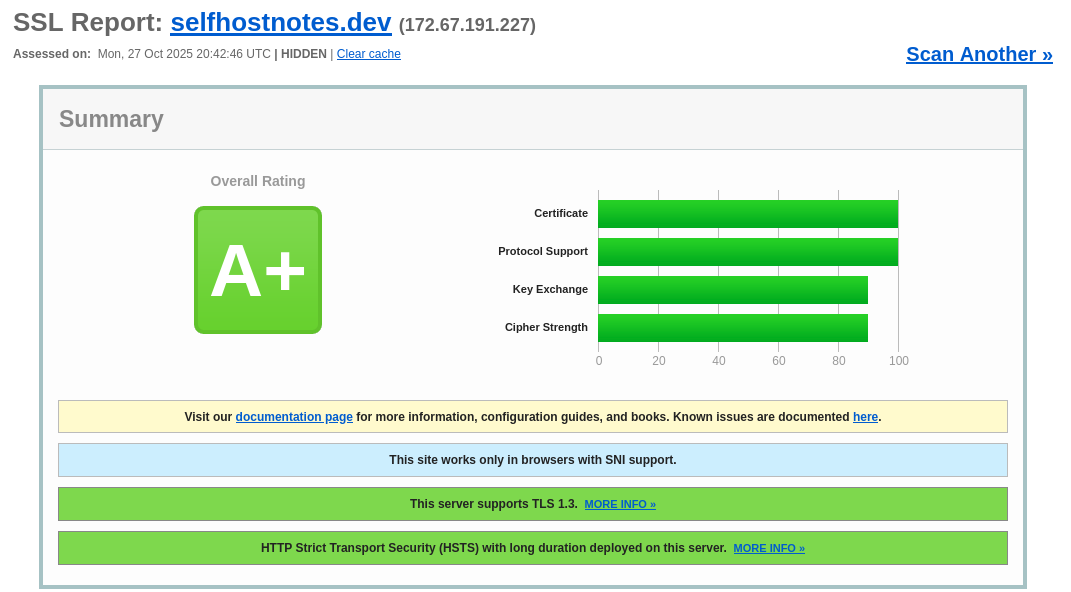
To obtain the same on securityheaders.com then check out my post on setting up Ghost
Rate Limiting
This can be created in Cloudflare but unfortunately the free plan doesn't allow policies to subdomains. I only wanted to apply something to Authelia and also for the API endpoint i have exposed for Focusreader to access FreshRSS.
http:
  middlewares:
    ratelimit:
      rateLimit:
        average: 30
        period: 10s
        burst: 50
traefik/data/dynamic/ratelimit.yml
Allow 50 connections to come through initially and then limit to 3 connections per second per client IP.
Monitor the access.log or Grafana dashboard for any HTTP 429 error codes to confirm if any requests have been limited.
Monitoring
Now the prometheus.yml file needs updating to scrape the metrics from traefik, in my case i use the keepalived VIP.
  - job_name: 'traefik'
    static_configs:
      - targets: ['x.x.x.x:8082']
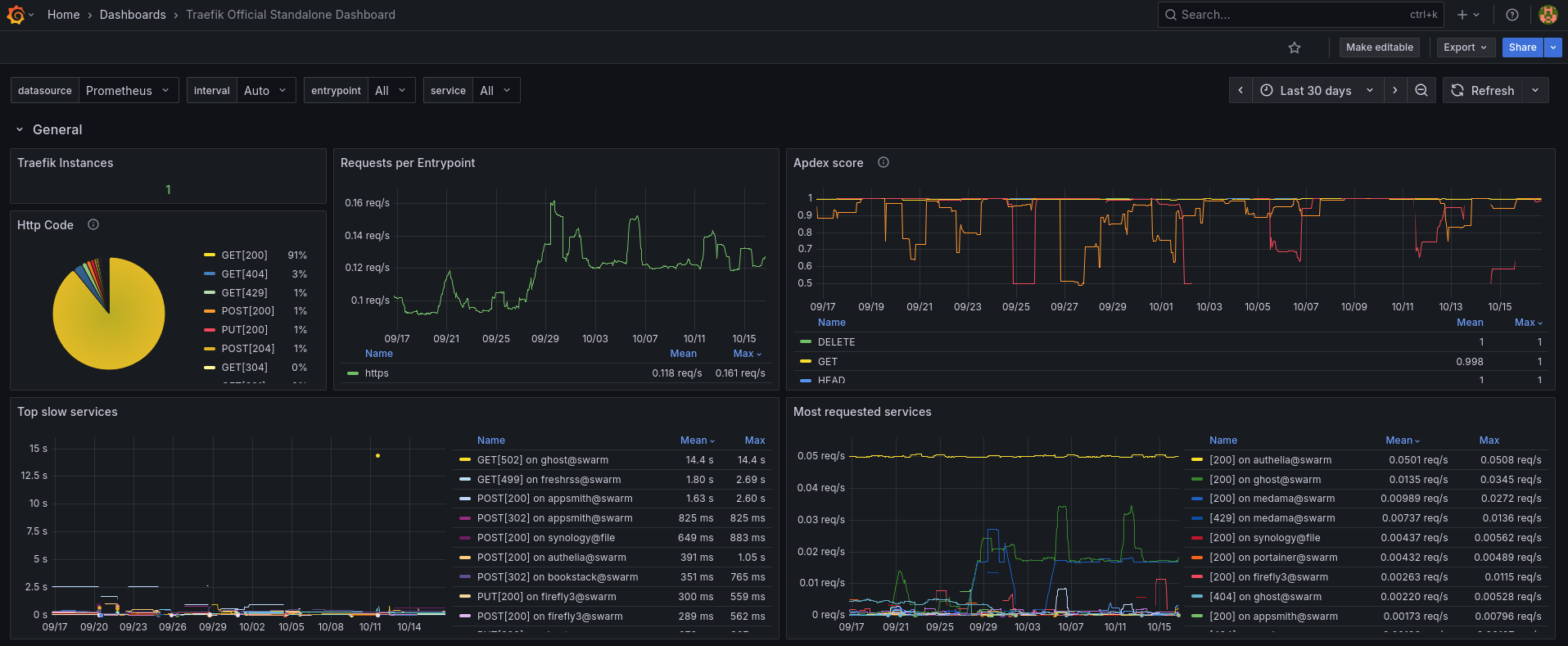
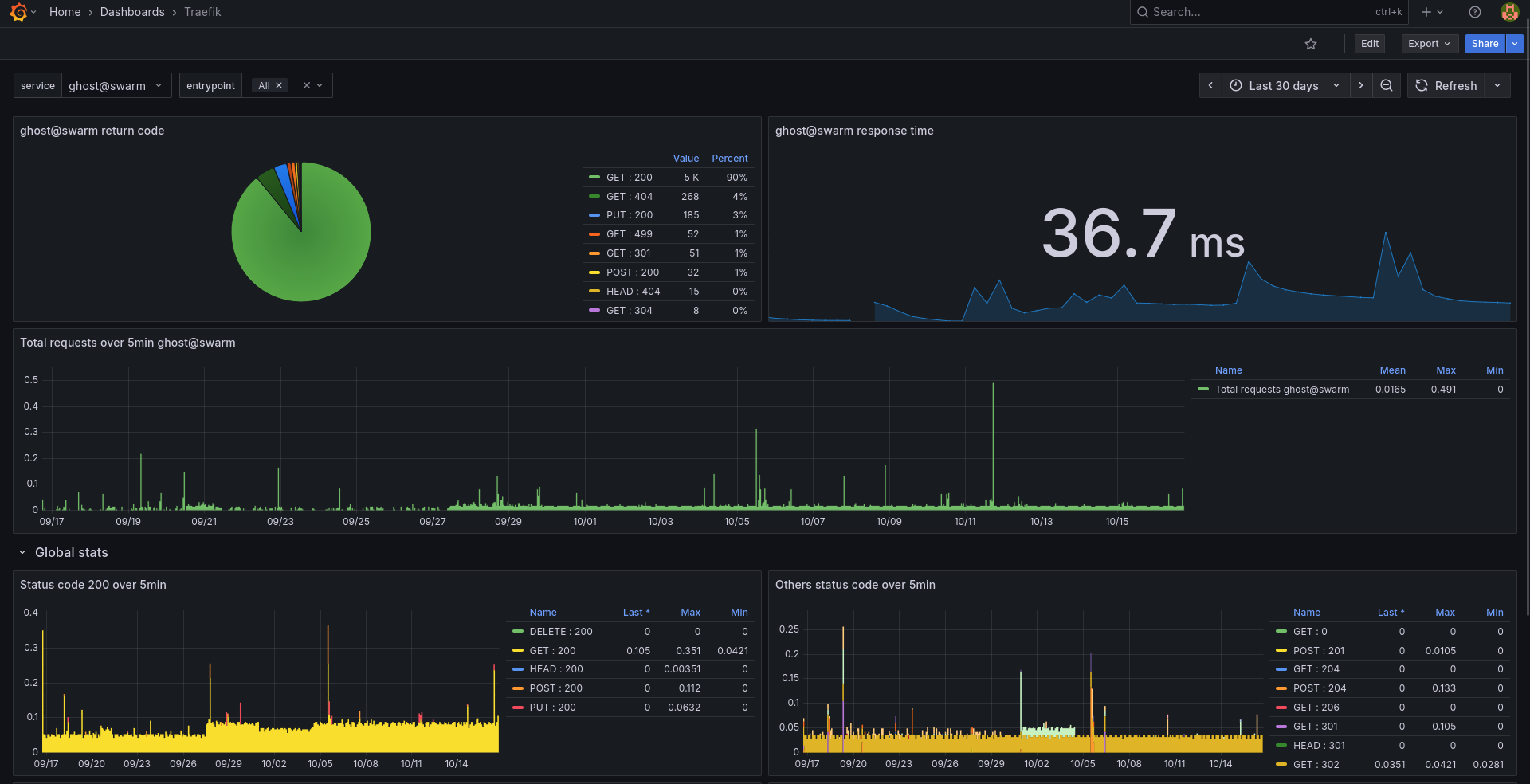
The official dashboard can be imported to Grafana using ID 17346 but the other one doesn't seem to be available any longer.
Crowdsec with Web Application Firewall
Config
Another internal network is required for crowdsec and the postgres database to communicate, along with another secret for the database password which you could create with openssl rand -hex 32 | docker secret create crowdsec_postgres_password -
I did confirm running more than 1 replica of crowdsec does work fine but i have left mine at just a single replica.
Ensure the plugin is added to your static traefik.yml file. Originally i set this up with 1.4.4 and updating was simply a case of changing the version and restarting traefik.
experimental:
  plugins:
    crowdsec-bouncer-traefik-plugin:
      moduleName: "github.com/maxlerebourg/crowdsec-bouncer-traefik-plugin"
      version: "v1.4.5"
traefik/data/traefik.yml
services:
  crowdsec:
    image: crowdsecurity/crowdsec:v1.7.4
    ports:
      - 6060:6060
    environment:
      COLLECTIONS: "crowdsecurity/traefik crowdsecurity/appsec-virtual-patching crowdsecurity/appsec-generic-rules crowdsecurity/http-cve LePresidente/authelia"
      DOCKER_HOST: tcp://socket-proxy-traefik:2375
    volumes:
      - ./db:/var/lib/crowdsec/data/
      - ./config:/etc/crowdsec/
      - /mnt/containers/_swarm/prod/traefik/logs/access.log:/var/log/traefik/access.log:ro
      - /mnt/containers/_swarm/prod/authelia/log/authelia.log:/var/log/authelia/authelia.log:ro
      - ./config/appsec.yaml:/etc/crowdsec/acquis.d/appsec.yaml
    networks:
      - proxy
      - socket-proxy-traefik
      - crowdsec_internal
    deploy:
      mode: replicated
      replicas: 1
      restart_policy:
        condition: on-failure
        delay: 5s
        max_attempts: 3
        window: 60s
      labels:
        - "gantry.services.excluded=true"
        - "traefik.environment=prod"

  crowdsec_db:
    image: postgres:15.13
    networks:
      - crowdsec_internal
    volumes:
      - /mnt/containers/_swarm/prod/crowdsec_db:/var/lib/postgresql/data
    environment:
      - POSTGRES_PASSWORD_FILE=/run/secrets/crowdsec_postgres_password
      - POSTGRES_USER=crowdsec
      - POSTGRES_DB=crowdsec
    secrets:
      - crowdsec_postgres_password
    deploy:
      mode: replicated
      endpoint_mode: dnsrr
      replicas: 1
      restart_policy:
        condition: on-failure
        delay: 5s
        max_attempts: 3
        window: 60s
      labels:
        - "gantry.services.excluded=true"
secrets:
  crowdsec_postgres_password:
    external: true

networks:
  proxy:
    external: true
  socket-proxy-traefik:
    external: true
  crowdsec_internal:
    external: true
crowdsec/docker-compose.yml
Once the stack is running, the documentation has a few steps to finish setting up the database.
DB Setup
Connect to the container and database and set the permissions:
docker exec -it crowdsec_db sh
psql -U crowdsec -d crowdsec
ALTER SCHEMA public owner to crowdsec;
GRANT ALL PRIVILEGES ON DATABASE crowdsec TO crowdsec;
GRANT CREATE on SCHEMA public TO crowdsec;
A few useful commands to check permissions
Who owns the schema: \dn+
Check db owner and privileges: \l crowdsec
Check schema privileges:
SELECT nspname, nspowner::regrole
FROM pg_namespace
WHERE nspname='public';
By default crowdsec uses a sqlite database so the config.yml file needs updating to use the postgres database
The documentation does state that an environment variable can be used for the db password in the config but i was unable to get this working so i will revisit this another day!
common:
  log_media: stdout
  log_level: info
  log_dir: /var/log/
config_paths:
  config_dir: /etc/crowdsec/
  data_dir: /var/lib/crowdsec/data/
  simulation_path: /etc/crowdsec/simulation.yaml
  hub_dir: /etc/crowdsec/hub/
  index_path: /etc/crowdsec/hub/.index.json
  notification_dir: /etc/crowdsec/notifications/
  plugin_dir: /usr/local/lib/crowdsec/plugins/
crowdsec_service:
  acquisition_path: /etc/crowdsec/acquis.yaml
  acquisition_dir: /etc/crowdsec/acquis.d
  parser_routines: 1
plugin_config:
  user: nobody
  group: nobody
cscli:
  output: human
db_config:
  #  log_level: info
  #  type: sqlite
  #  db_path: /var/lib/crowdsec/data/crowdsec.db
  type: pgx
  user: crowdsec
  password: yourpostgrespassword
  db_name: crowdsec
  host: crowdsec_db
  port: 5432
  flush:
    max_items: 5000
    max_age: 7d
  use_wal: false
api:
  client:
    insecure_skip_verify: false
    credentials_path: /etc/crowdsec/local_api_credentials.yaml
  server:
    log_level: info
    listen_uri: 0.0.0.0:8080
    profiles_path: /etc/crowdsec/profiles.yaml
    trusted_ips: # IP ranges, or IPs which can have admin API access
      - 127.0.0.1
      - ::1
    online_client: # Central API credentials (to push signals and receive bad IPs)
      credentials_path: /etc/crowdsec//online_api_credentials.yaml
    enable: true
prometheus:
  enabled: true
  level: full
  listen_addr: 0.0.0.0
  listen_port: 6060
crowdsec/config/config.yaml
Acquisitions Config
We need to provide the files for crowdsec to monitor, initially mine were all configured in the acquis.yaml file which needs to be formatted like so when adding multiple files.
filenames:
  - /var/log/traefik/access.log
labels:
  type: traefik
---
filenames:
  - /var/log/authelia/authelia.log
labels:
  type: authelia
---
filenames:
 - /var/log/auth.log
 - /var/log/syslog
labels:
  type: syslog
/config/acquis.yaml
The recommendation now is to leave the aquis.yaml file and instead create separate files under /config/aquis.d/ so i've moved out of this file and created individual files
filenames:
  - /var/log/traefik/access.log
labels:
  type: traefik
/config/acquis.d/traefik.yaml
filenames:
  - /var/log/authelia/authelia.log
labels:
  type: authelia
/config/acquis.d/authelia.yaml
Crowdsec Local API Key
Once the container is up and running we need to register the traefik bouncer to generate the LAPI key for the middleware file.
Connect in to the container and run cscli bouncers add traefik-bouncer then add this key to the following dynamic crowdsec middleware file
http:
  middlewares:
    crowdsec:
      plugin:
        crowdsec-bouncer-traefik-plugin:
          CrowdsecLapiKey: yourapikey
          Enabled: "true"
          crowdsecAppsecEnabled: true
          apiUrl: "http://crowdsec:8080"
traefik/data/dynamic/crowdsec.yml
You should now see this connected with cscli bouncers list
Send a test alert to confirm everything is working from an external IP address... i did a hotspot from my phone and tested from my laptop.
curl -I https://app.example.com/crowdsec-test-NtktlJHV4TfBSK3wvlhiOBnl
Confirm the event triggered with cscli alerts list -s crowdsecurity/http-generic-test
Test the WAF...
curl -I https://app.example.com/crowdsec-test-NtktlJHV4TfBSK3wvlhiOBnl
crowdsec cscli alerts list -s crowdsecurity/appsec-generic-test
Monitoring
Crowdsec Cloud Console
Sign up for an account and link your installation to the console using cscli console enroll with the provided token in your dashboard.
Prometheus / Grafana
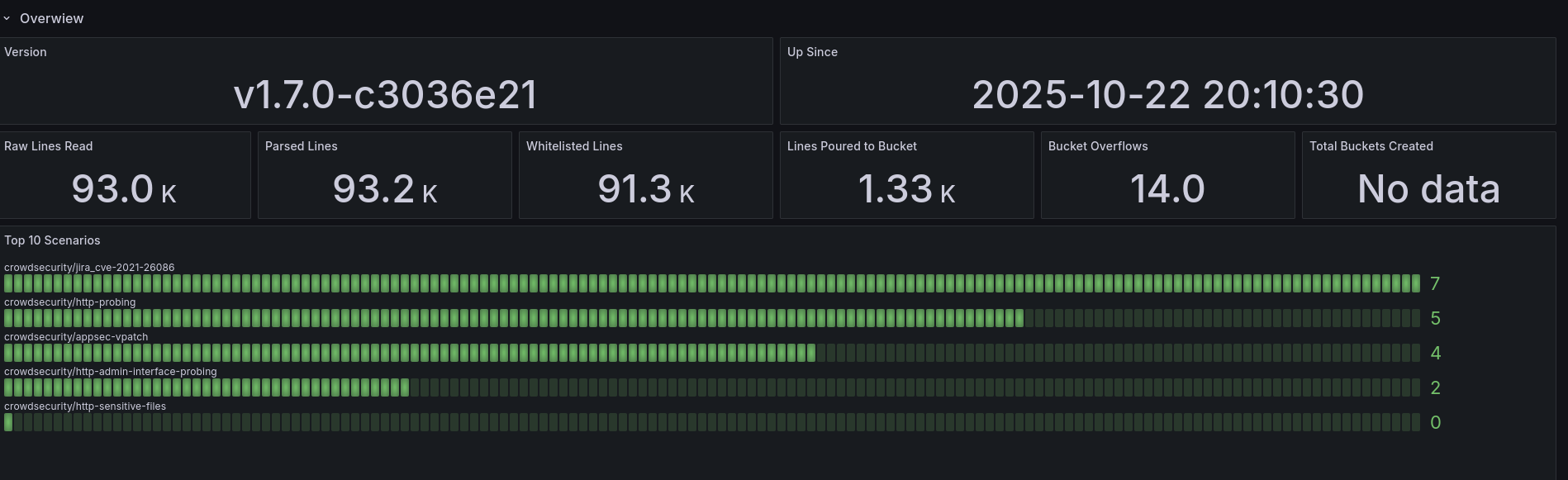
The default config exports prometheus metrics so you should just be able to import a dashboard. Import the one below with ID 21419
Useful Commands
cscli alerts list
cscli capi status
cscli collections list
cscli decisions list
cscli decisions list --origin CAPI
cscli decisions add --ip 10.0.0.30 -d 10m
cscli decisions remove --ip 10.0.0.10
cscli machines list
cscli metrics show decisions
cscli metrics list
cscli metrics show acquisition
cscli metrics show engine
cscli metrics show appsec
cscli metrics show acquisition parsers
cscli parsers list
cscli scenarios list
Issues Encountered
The database was created using collation version 2.36, but the operating system provides version 2.41
This happened randomly after everything had been working fine for a few weeks, i suspect something updated in the container or an update on the host causing the db to not load. This then had a knock on effect to the containers that use the crowdsec middleware since the bouncer will deny requests if crowdsec is unavailable.
crowdsec_crowdsec_db.1.p7eqzkic0zlf@sn3 | 2025-08-31 16:19:41.981 UTC [51] WARNING: database "postgres" has a collation version mismatch
crowdsec_crowdsec_db.1.p7eqzkic0zlf@sn3 | 2025-08-31 16:19:41.981 UTC [51] DETAIL: The database was created using collation version 2.36, but the operating system provides version 2.41.
crowdsec_crowdsec_db.1.p7eqzkic0zlf@sn3 | 2025-08-31 16:19:41.981 UTC [51] HINT: Rebuild all objects in this database that use the default collation and run ALTER DATABASE postgres REFRESH COLLATION VERSION, or build PostgreSQL with the right library version.
docker exec -it crowdsec_crowdsec_db.1.nnyn5xg2em1diumkgenddxd4h sh

psqls -U crowdsec -d crowdsec
ALTER DATABASE crowdsec REFRESH COLLATION VERSION;

psqls -U crowdsec -d template1
ALTER DATABASE template1 REFRESH COLLATION VERSION;

psqls -U crowdsec -d postgres
ALTER DATABASE postgres REFRESH COLLATION VERSION;
Consistently high bandwidth with default sqlite database over NFS
After getting this all setup i happened to notice in Grafana a constant ~50Mbit bandwidth being used. After some investigating it turned out it was the database so it was time to change this to postgres.
After migrating CrowdSec from SQLite to PostgreSQL, all machine and bouncer registrations are lost because they’re stored in the database.
The local agent and traefik middleware need re-registering to authenticate with the new backend.
cscli machines add -a --force
cscli bouncers add traefik-bouncer
Then the crowdsec.yml middleware needs updating with the new API key.
Authelia
First we need to generate the session secret and storage encryption keys, since i only have a couple of users i'm just using a yaml file for the users with SQLite3 backend.
Revisiting this setup after a few years i've now improved the security of my original compose file by removing the need for the secrets to be in the configuration.ymlby using secrets instead.
Generate random passwords and create the secrets
openssl rand -hex 64 | docker secret create authelia_session_secret -
openssl rand -hex 64 | docker secret create authelia_storage_enc_key -
Or if you have a password you already want to use
echo -n 'oldsessionsecret' | docker secret create authelia_session_secret -
echo -n 'oldstoragekey' | docker secret create authelia_storage_enc_key -
Swarm Configuration
services:
  authelia:
    image: authelia/authelia:4.39.6
    volumes:
      - ./config:/config
      - ./log:/var/log/authelia
    user: "202:202"
    networks:
      - proxy
    secrets:
      - authelia_session_secret
      - authelia_storage_enc_key
    environment:
      AUTHELIA_SESSION_SECRET_FILE: /run/secrets/authelia_session_secret
      AUTHELIA_STORAGE_ENCRYPTION_KEY_FILE: /run/secrets/authelia_storage_enc_key
      TZ: Europe/London
    deploy:
      mode: replicated
      replicas: 1
      restart_policy:
        condition: on-failure
        delay: 5s
        max_attempts: 3
        window: 60s
      labels:
        - "gantry.services.excluded=true"
        - 'traefik.enable=true'
        - 'traefik.http.routers.authelia.rule=Host(`auth.example.com`)'
        - 'traefik.http.routers.authelia.entrypoints=https'
        - 'traefik.http.routers.authelia.tls=true'
        - 'traefik.http.middlewares.authelia.forwardauth.address=http://authelia:9091/api/authz/forward-auth'
        - 'traefik.http.middlewares.authelia.forwardauth.trustForwardHeader=true'
        - 'traefik.http.middlewares.authelia.forwardauth.authResponseHeaders=Remote-User,Remote-Groups,Remote-Name,Remote-Email'
        - "traefik.http.routers.authelia.middlewares=sts,crowdsec@file,ratelimit@file"
        - "traefik.http.services.authelia.loadbalancer.server.port=9091"
        - "traefik.environment=prod"
secrets:
  authelia_session_secret:
    external: true
  authelia_storage_enc_key:
    external: true

networks:
  proxy:
    external: true
authelia/docker-compose.yml
With the swarm config using secrets, these options need commenting out in the configuration.yml
session:
  #secret:

storage:
  #encryption_key:
authelia/config/configuration.yml
Compose Configuration
services:
  authelia:
    image: authelia/authelia
    container_name: authelia
    volumes:
      - /mnt/containers/authelia/config:/config
      - /mnt/containers/authelia/log:/var/log/authelia
    networks:
      - proxy
    labels:
      - 'traefik.enable=true'
      - 'traefik.http.routers.authelia.rule=Host(`auth.example.com`)'
      - 'traefik.http.routers.authelia.entrypoints=https'
      - 'traefik.http.routers.authelia.tls=true'
      - 'traefik.http.middlewares.authelia.forwardauth.address=http://authelia:9091/api/authz/forward-auth'
      - 'traefik.http.middlewares.authelia.forwardauth.trustForwardHeader=true'
      - 'traefik.http.middlewares.authelia.forwardauth.authResponseHeaders=Remote-User,Remote-Groups,Remote-Name,Remote-Email'
      - "traefik.http.routers.authelia.middlewares=sts,crowdsec@file,ratelimit@file""

    expose:
      - 9091
    restart: always
    environment:
      - TZ=Europe/London
      - PUID=1000
      - GUID=1000
    healthcheck:
      disable: true
    security_opt:
      - no-new-privileges:true

networks:
  proxy:
    external: true
authelia/docker-compose.yml
Authelia Configuration
server:
  address: 'tcp://0.0.0.0:9091/authelia'
log:
  level: info
  format: text
  file_path: /var/log/authelia/authelia.log

totp:
  issuer: authelia

authentication_backend:
  password_reset:
    disable: true
  file:
    path: /config/users_database.yml
    password:
      algorithm: argon2id
      iterations: 1
      salt_length: 16
      parallelism: 8
      memory: 64
    search:
      email: true

access_control:
  default_policy: deny
  networks:
    - name: internal
      networks:
        - '10.0.0.0/24'
        - '192.168.0.0/24'
    - name: external_trusted
      networks:
        - '1.2.3.4'
        - '5.6.7.8'
    - name: openvpn
      networks:
        - '192.168.1.0/24'
    - name: wireguard
      networks:
        - '192.168.2.0/24'

  rules:
    - domain: 'app1.example.com'
      policy: bypass
      networks:
        - 'internal'
        - 'external_trusted'
        - 'openvpn'
        - 'wireguard'
    - domain: 'app1.example.com'
      policy: two_factor


    - domain: 'app2.example.com'
      policy: bypass
      networks:
        - 'internal'
        - 'openvpn'
        - 'wireguard'

    - domain: 'app2.example.com'
      policy: bypass
      resources:
        - '^/api$'
        - '^/api/'

    - domain: 'app2.example.com'
      policy: two_factor

session:
  name: authelia_session
  # This secret can also be set using the env variables AUTHELIA_SESSION_SECRET_FILE
  secret: yoursecret #comment out if using secrets
  expiration: 8h
  inactivity: 1h
  cookies:
    - domain: example.com
      authelia_url: 'https://auth.example.com'

regulation:
  max_retries: 3
  find_time: 120
  ban_time: 300

storage:
  encryption_key: yourkey # comment out if using secrets
  local:
    path: /config/db.sqlite3

notifier:
  filesystem:
    filename: /config/notification.txt

ntp:
  address: "time.cloudflare.com:123"
  version: 3
  max_desync: 3s
  disable_startup_check: false
  disable_failure: true
authelia/config/configuration.yml
Users
Create new users by running docker exec -it authelia authelia crypto hash generate argon2 --password password
users:
  nick:
    displayname: "Nick"
    password: "$argon2id$v=yourpassword"
    email: [email protected]
    groups:
      - admins
      - jellyfin-admins
      - jellyfin-users
  user2:
    displayname: "User2"
    password: "$argon2id$v=yourpassword"
    email: [email protected]
    groups:
      - admins
      - jellyfin-users
authelia/config/users_database.yml
Firewall
Not everything is suitable for being behind a cloudflare tunnel due to the 100MB upload limit on the free tier so i wanted to achieve security with the services i expose directly.... currently just Jellyfin for now but in the future i do want to look at Immich.
In Cloudflare i have a rule to only allow traffic from the UK, i wanted to do the same for my directly exposed traefik instance to block the majority of threats at the first line of defense.
Since i am using pfSense i installed the pfBlockerNG-devel package to implement this. For the Geo blocking feature you need a MaxMind license.
Under IP > IPv4 i created a new list as follows:
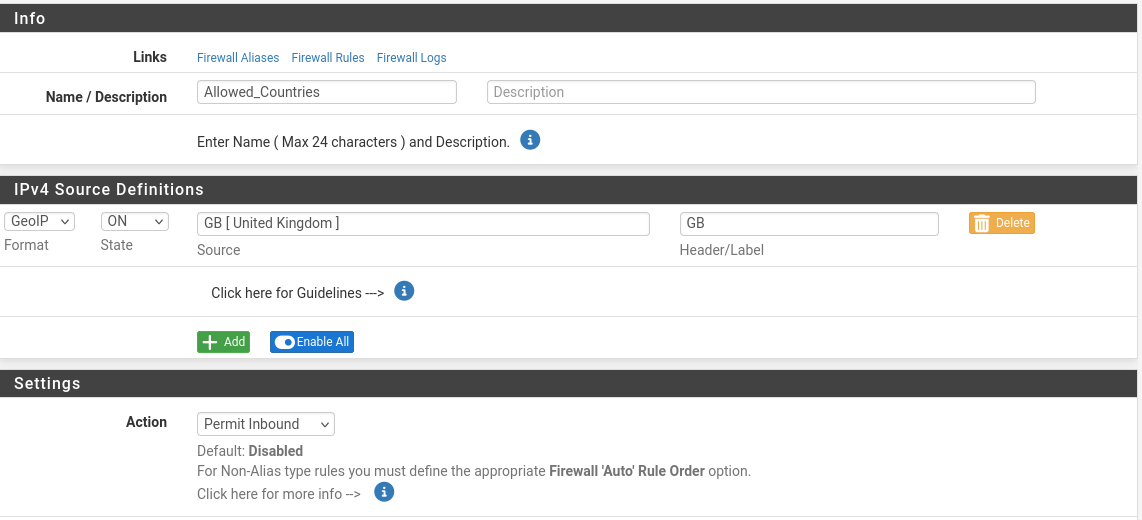
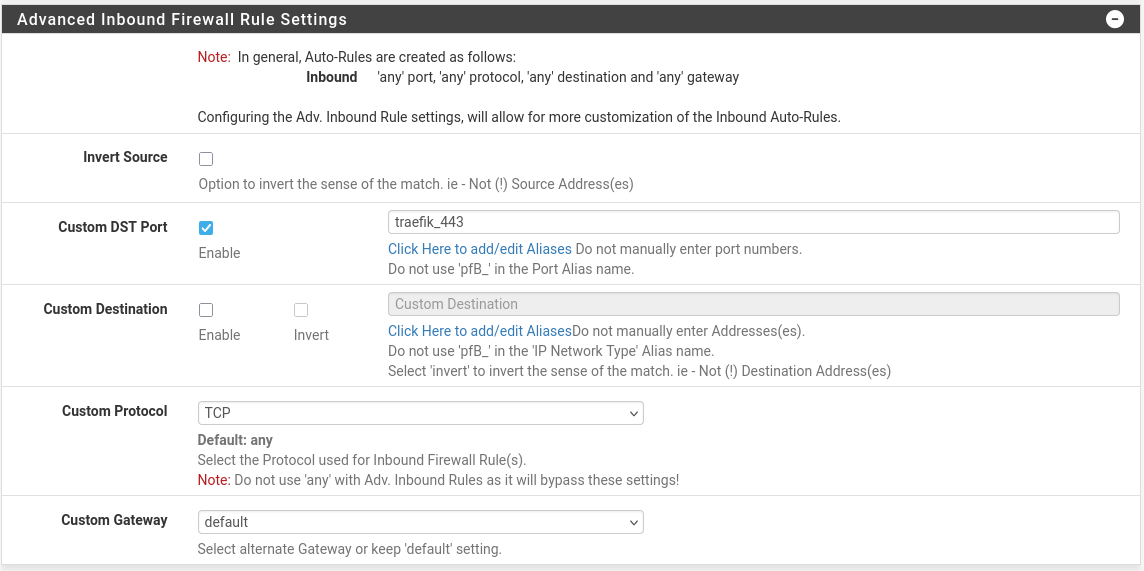
This creates a Firewall rule for you like so

A simple test with your favourite VPN provider should now prove connections from a country outside of this list are blocked. Any successful requests will then be passed to traefik where crowdsec and the WAF will perform additional checks.
If you run in to "Cannot allocate memory" errors then you may need to increase the Firewall Maximum Table Entries under System > Advanced > Firewall & NAT from default (400,000) to 800000 and also enable CIDR Aggregation under pfBlockerNG > IP